
Why Your Brand and Your Website Must Speak the Same LanguageUX & Conversion
Volver al blog
UX & Conversion
Why Your Website Doesn't Generate Clients (And How to Fix It)
If your site gets traffic but no leads, the problem isn't the traffic. Discover the most common reasons why websites don't convert — and what to do about it.
M
Written by Miguel Prot
Published by Hamaca Web Solutions
7 min read
You have a website. You even get visitors. But clients aren't coming.
You're not alone. This is one of the most frustrating situations for any business with a digital presence: traffic without conversion.
The good news is that it almost always has a solution — and it doesn't necessarily require rebuilding everything from scratch. In most cases, the problems are identifiable and fixable with the right adjustments.
Here are the 7 most common reasons why a website doesn't sell, and what to do in each case.
1. It's Not Clear What You Do or Who It's For
The first 5 seconds on your site are decisive.
If a visitor arrives and doesn't immediately understand what you offer, who it's for, and why they should care — they leave. Without thinking twice.
Many sites make the mistake of talking about themselves before talking about the problem they solve. Users aren't looking for your story — they're looking for their solution.
What to do:
- Your main message (hero) must answer: what do you do, for whom, and what result does it achieve?
- Use your customer's language, not industry jargon
- Remove generic phrases like "comprehensive quality solutions"
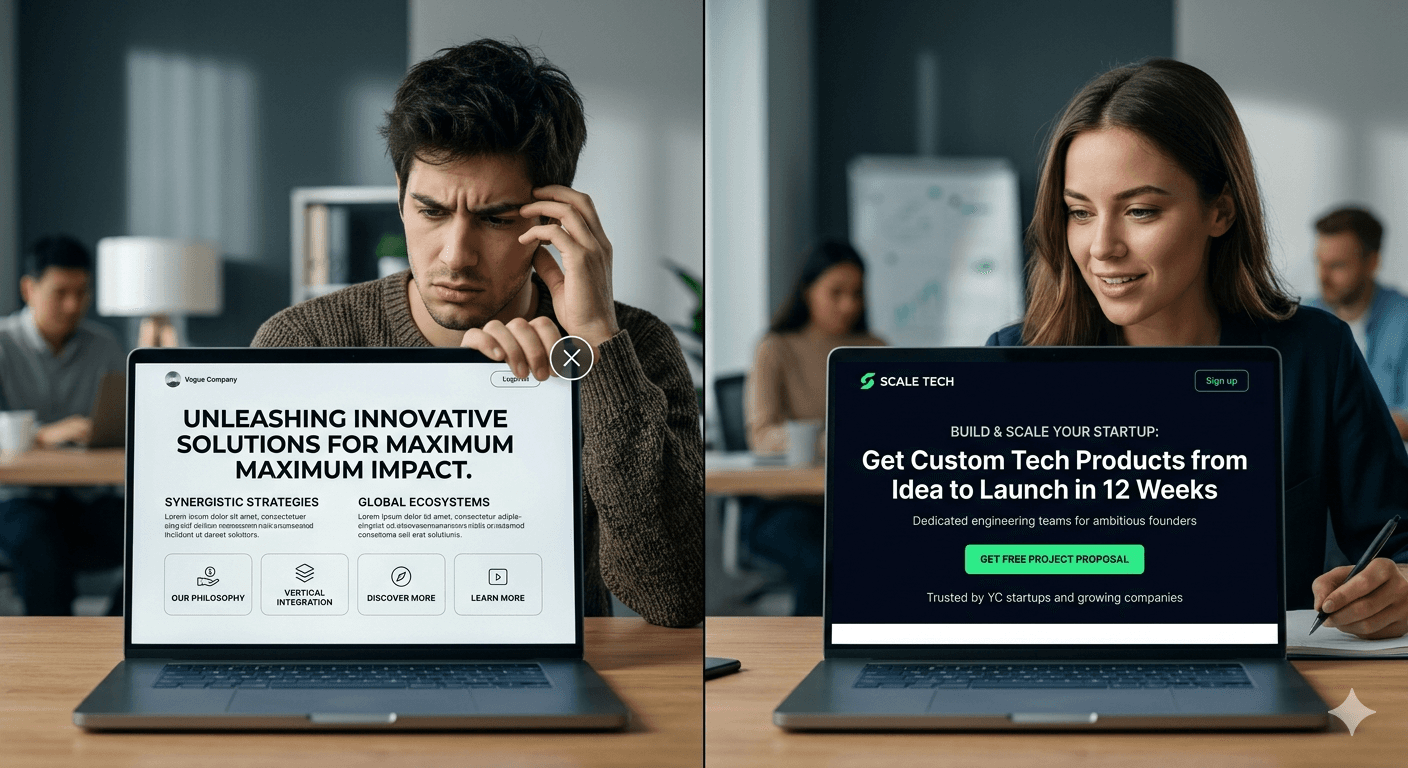
2. Your Call to Action is Weak or Missing
A site without a clear CTA is like a store with no cash register.
The visitor arrives, they're interested in what they see... and they don't know what to do next. There's no obvious button, the form is buried, or there are too many options that paralyze the decision.
What to do:
- Define one primary action per page (schedule, quote, download, call)
- The CTA must be visible without scrolling
- Use direct action verbs: "Get your free diagnosis", not "Contact us"
3. Load Speed Is Scaring Away Your Visitors
Google and users penalize slow sites — but in different ways.
Google drops them in rankings. Users simply leave. Studies consistently show that more than 50% of visitors abandon a site that takes more than 3 seconds to load.
If your site was built years ago, or is loaded with plugins, unoptimized images, and unnecessary code, speed may be your biggest invisible enemy.
What to do:
- Measure your speed at PageSpeed Insights
- Optimize images (use WebP, compress before uploading)
- Remove plugins or scripts you don't use
- Consider migrating to a more modern architecture
4. It Doesn't Build Trust
Before buying, people evaluate whether they can trust you.
A site with an outdated design, no real testimonials, no team photos, no success stories or certifications, generates distrust — even if your services are excellent.
Trust isn't requested. It's built visually and with evidence.
What to do:
- Include real testimonials with name, photo, and context
- Show previous projects (portfolio)
- Add client logos or media where you've appeared
- If possible, include video — it humanizes like nothing else

5. It's Designed to Look Good, Not to Convert
There's a huge difference between a pretty site and an effective site.
A site can win design awards and not generate a single lead. Why? Because visual design and conversion design answer different goals.
Conversion design asks: how do I guide the user toward the action I want them to take?
What to do:
- Review the navigation flow: does it naturally lead to the next step?
- Make sure each section has a clear purpose
- Evaluate whether you're prioritizing aesthetics over clarity
6. It's Not Optimized for Mobile
In 2026, more than 60% of web traffic comes from mobile devices.
If your site looks great on desktop but is hard to navigate on a phone — small forms, menus that don't work well, poorly proportioned images — you're losing the majority of your visitors.
What to do:
- Test your site on multiple devices and screen sizes
- Verify that buttons are easy to tap with a finger
- Remove elements that break on small screens
7. You Have No Follow-Up Strategy
Most people don't buy on the first visit.
If your site doesn't capture data (email, phone) and has no integration with follow-up tools (CRM, email marketing), you're letting go of people who were interested but not yet ready.
What to do:
- Offer something valuable in exchange for an email (guide, diagnosis, discount)
- Set up retargeting with Google or Meta Ads
- Implement a simple CRM so you don't lose leads
How Many of These Problems Does Your Site Have?
If you identified with 2 or more of these points, your site is leaving money on the table — right now.
The good news: all of them are solvable. Some require small adjustments, others may require a deeper redesign. But the first step is always a diagnosis.
At Hamaca Web Solutions we do conversion audits to identify exactly where the problem is and which action has the biggest impact.
On TripFinders, for example, simplifying the booking process — clear filters, direct navigation, and dual-currency pricing — translated into more booking and quote requests during the first three months after launch.
If the diagnosis points to something deeper — not a tweak, but a rebuild — here's how I approach a full Web Development project.
See Web Development I want my site reviewedHave a project in mind?
Tell me what you need and we'll figure out the best approach for your business.
Tell me about your project Free quote · Reply within 24 hoursRecommended
- The Future of Web Design in 2026: Key TrendsUX & Conversion
- Website vs. Web App: What Does Your Business Actually Need?Web Development